Care that meets you in clinic, at home, or online.

One app for consultations, records, and everything that follows.

01 The Curamigo App

Three consultation modes. One patient experience.

Three consultation modes mean care fits your situation—whether you need to be there in person, have a provider come to you, or connect from wherever you are.

Your way into care

Choose where the consultation happens

Curamigo brings in-clinic visits, home visits, and online video consultations into one clear patient journey.

  • In-clinic consultation for in-person care
  • Home visit when care needs to come closer
  • Online video for a face-to-face conversation at a distance
  • Records, medication, vitals, and family profiles alongside care
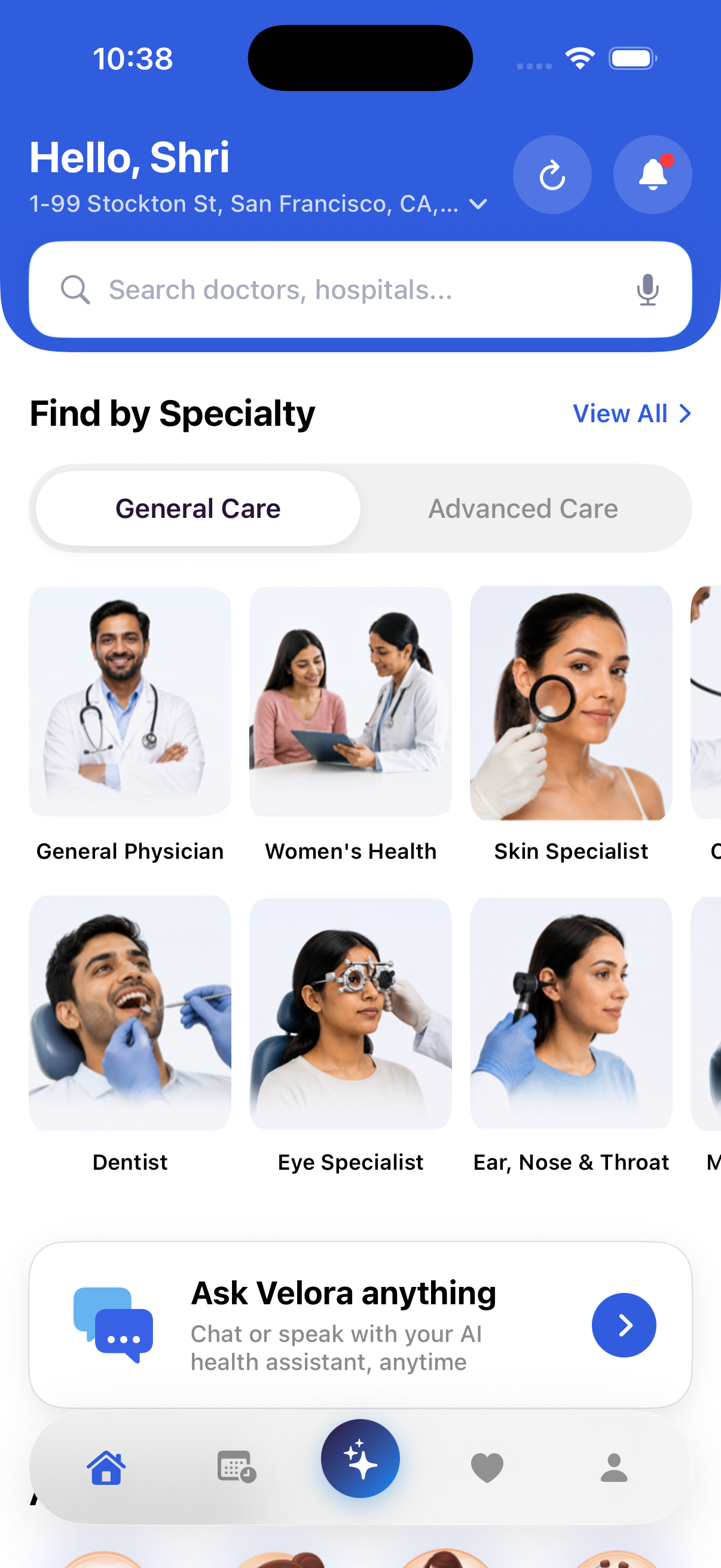
Curamigo App showing doctor and hospital search, care categories, and the Velora health assistant

Records

Your record travels with you

Curamigo keeps prescriptions, reports, and scans together—connected to the consultation they belong to.

Family

Care without mixing records

Look after a parent, spouse, child, or sibling while preserving a separate health story for each person.

Velora AI

Clear guidance, clear limits

Velora explains health language and helps organize symptoms. It does not diagnose or prescribe.

Specialist care

Start with the kind of care you need.

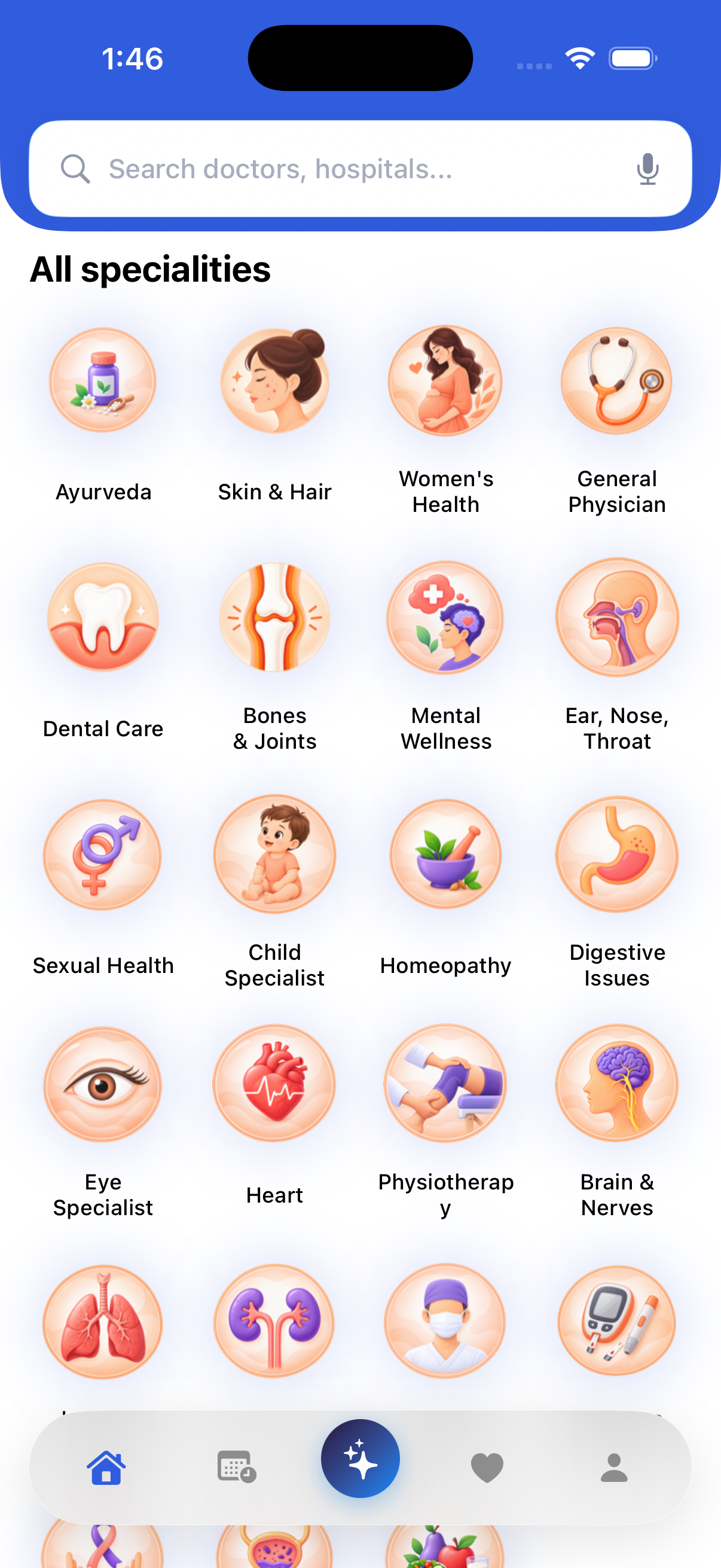
Inside the Curamigo App, care is organized into understandable categories so patients can explore the relevant kind of specialist before choosing a consultation mode.

Curamigo App screen showing specialist categories including general physician, women's health, skin and hair, dental, eye, heart and other care areas
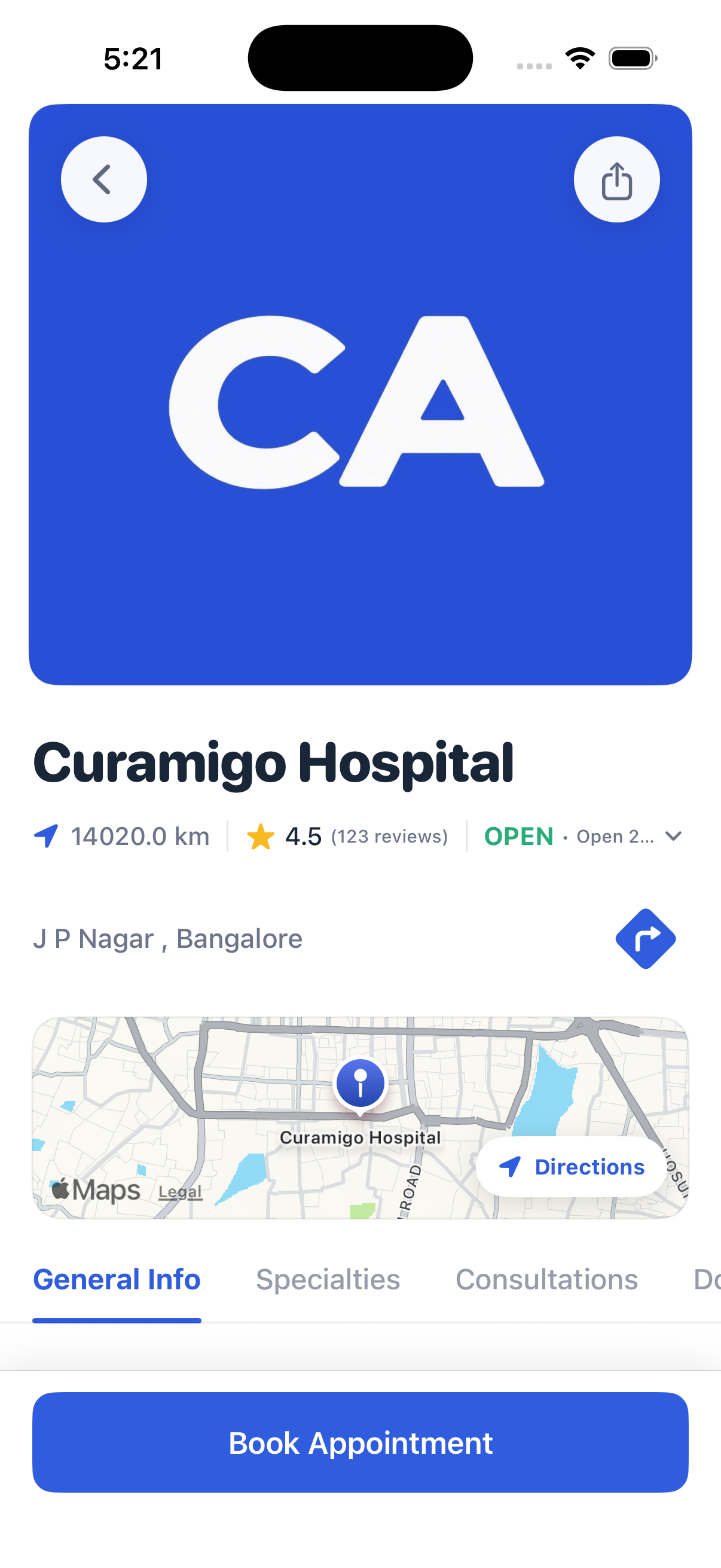
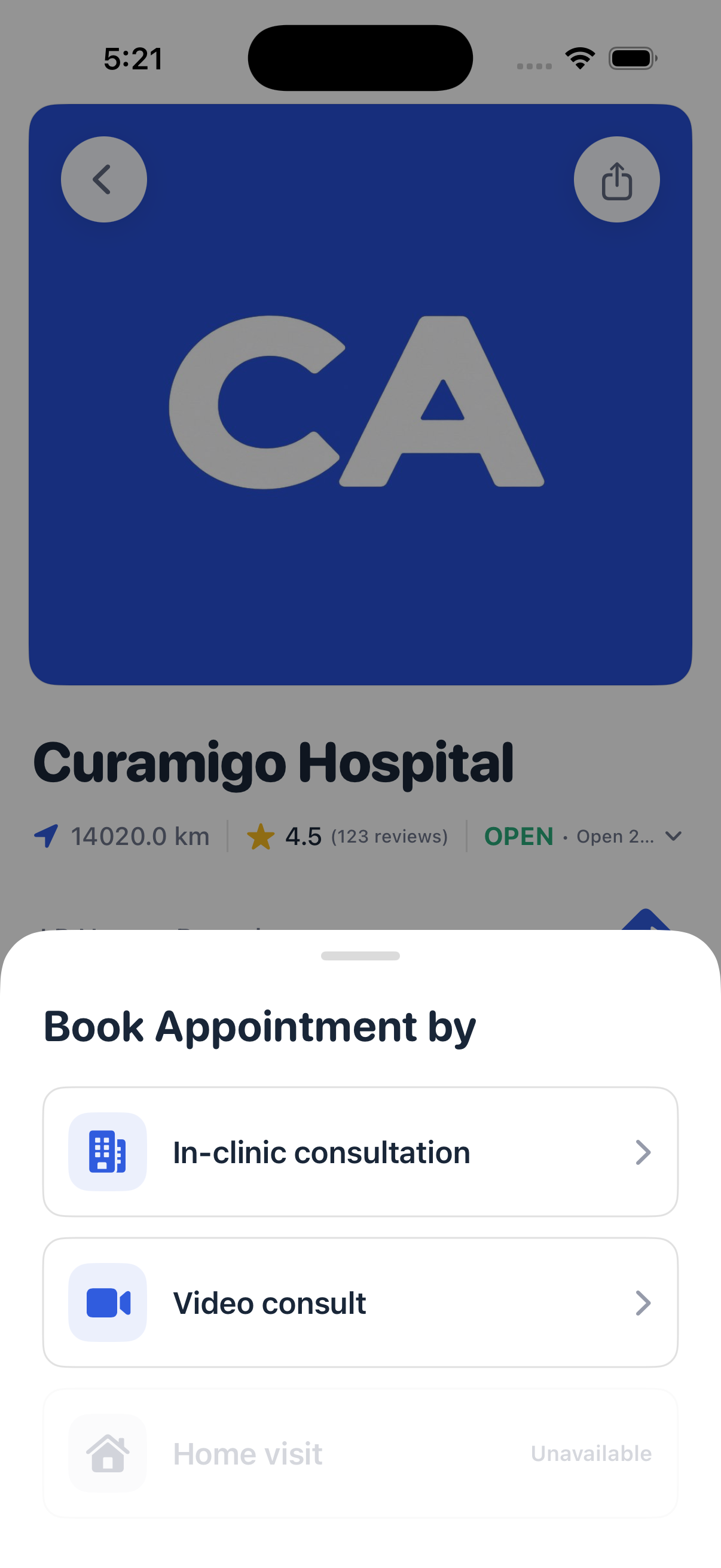
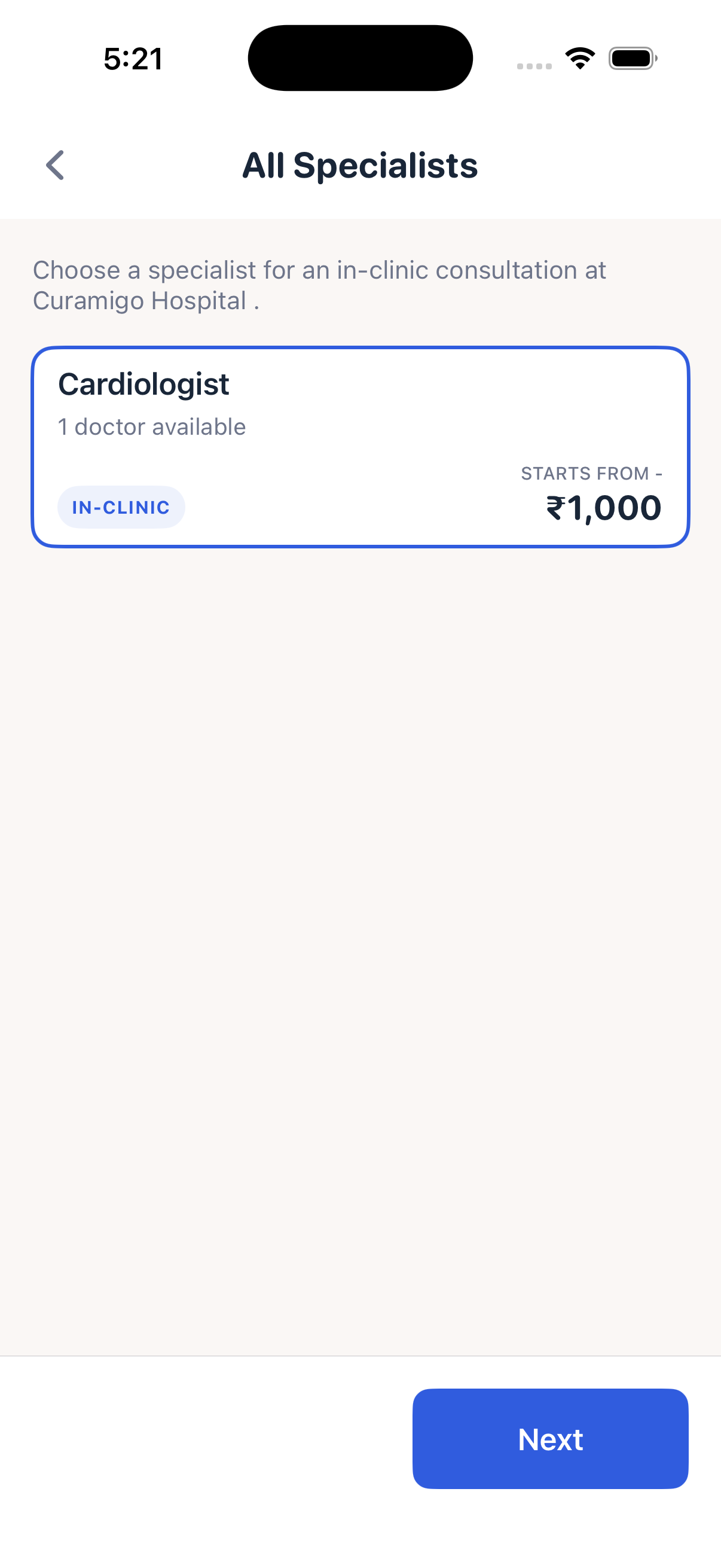
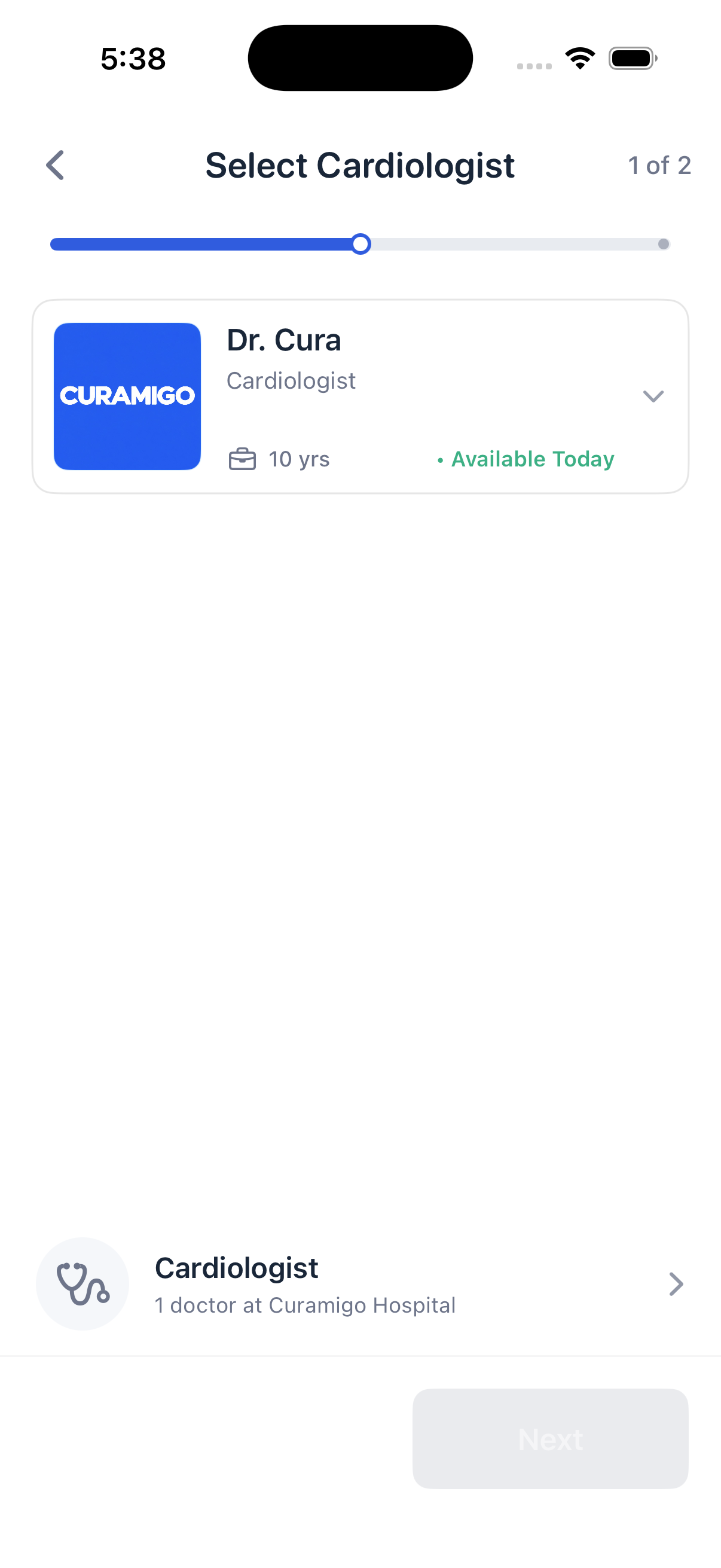
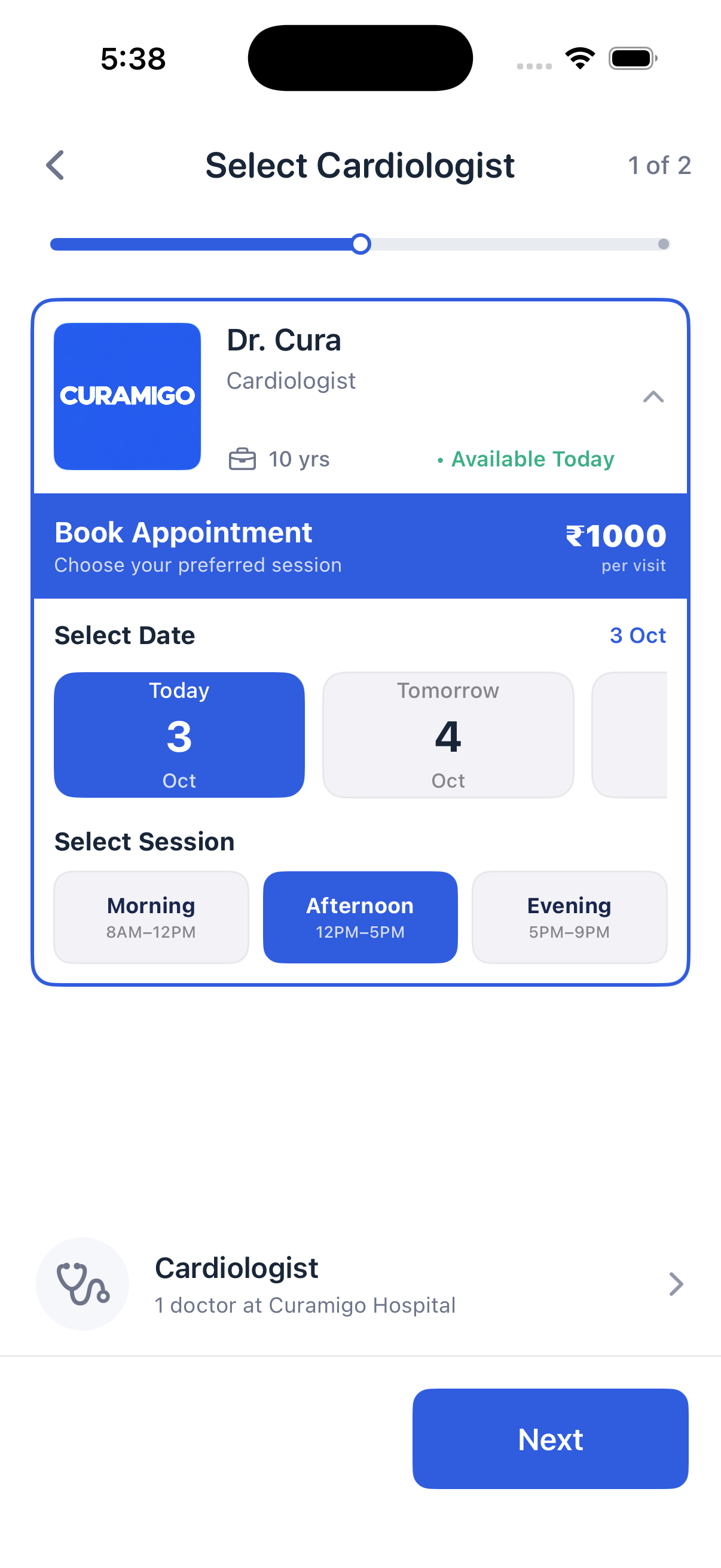
Curamigo Hospital profile showing rating, location, map and a Book Appointment action Book Appointment by sheet offering in-clinic consultation, video consult and home visit All Specialists screen listing cardiology with doctors available and a starting fee Select Cardiologist screen showing the doctor's experience and today's availability Date and session selection with morning, afternoon and evening options and the fee per visit

How booking works

A few clear steps inside the app.

Booking happens in the Curamigo App, where each step is shown plainly—who you are seeing, what it costs, and when they are available.

  1. 01

    Open the hospital or clinic

    See the profile first—location, map, open hours and patient rating—so you know where the care is happening before anything else.

  2. 02

    Choose how you want to consult

    Pick in-clinic, video consult or home visit. Modes a provider does not offer are shown as unavailable rather than hidden.

  3. 03

    Pick the specialist you need

    Browse the specialities offered there, with how many doctors are available and the fee the consultation starts from.

  4. 04

    Choose your doctor

    Each doctor shows years of experience and whether they are available today, with a step indicator tracking your progress.

  5. 05

    Select a date and session

    Choose the day, then a morning, afternoon or evening session. The fee per visit stays visible before you continue.

Doctors, fees, dates and available slots depend on the participating hospital or clinic. Appointments are arranged in the app, not on this website.

Connected care

Consultation first. Continuity follows.

The three consultation modes are Curamigo's core. Records, medication, tracking, family profiles and guidance make each consultation more useful before and after it happens.

Consultation modes

Care that can meet you in three ways

The patient experience supports different consultation settings. Availability depends on the care provider and is handled inside the Curamigo app, not on this website.

  • 01In-clinic

    Meet at the clinic or hospital when an in-person examination is the right setting.

  • 02Home visit

    Receive care at home when the provider makes that consultation mode available.

  • 03Online video

    Speak face to face from wherever you are and keep the resulting care information with your record.

Records that stay together

Keep prescriptions, lab reports and scans in one place, connected to the consultation and date they belong to instead of scattered across drawers, envelopes and inboxes.

  • Prescriptions
  • Lab reports
  • Scans

A clear record after every consultation

Return to prescriptions and shared care instructions after the conversation ends, when details can be difficult to remember and follow-up questions begin.

Vitals and medication, side by side

Log blood pressure, blood sugar, heart rate, blood oxygen, body temperature and sleep, then keep morning, evening and night medication routines in one understandable schedule.

Velora AI, with clear limits

Speak or type to understand health terms, organise symptoms and prepare questions. Velora does not diagnose or prescribe, and urgent concerns should go directly to emergency services.

Family profiles that remain separate

Look after a parent, spouse, child or sibling from one account while preserving an individual record and medication routine for each person.

Language that feels familiar

The patient interface is designed for English and a broad set of Indian languages, including Hindi, Tamil, Telugu, Bengali, Assamese, Maithili and Konkani.

An emergency ID made to scan quickly

Keep blood group, conditions, allergies and an emergency contact in a format designed to be read when you cannot explain the information yourself.

Velora AI

Speak naturally. Find a clearer next step.

Velora is Curamigo's AI healthcare companion inside the app. Speak aloud or type a message in a supported Indian language to make health information easier to understand and prepare for the care conversation ahead.

  1. 01

    Explain health language

    Ask about unfamiliar health terms and receive a plain-language explanation designed to make the information easier to follow.

  2. 02

    Put symptoms into words

    Describe what you are experiencing and let Velora help organise the details and questions you may want to share during a consultation.

  3. 03

    Navigate toward relevant care

    Explore an appropriate care category or specialist type to consider, then continue through the consultation options available in Curamigo.

  4. 04

    Talk or type—your choice

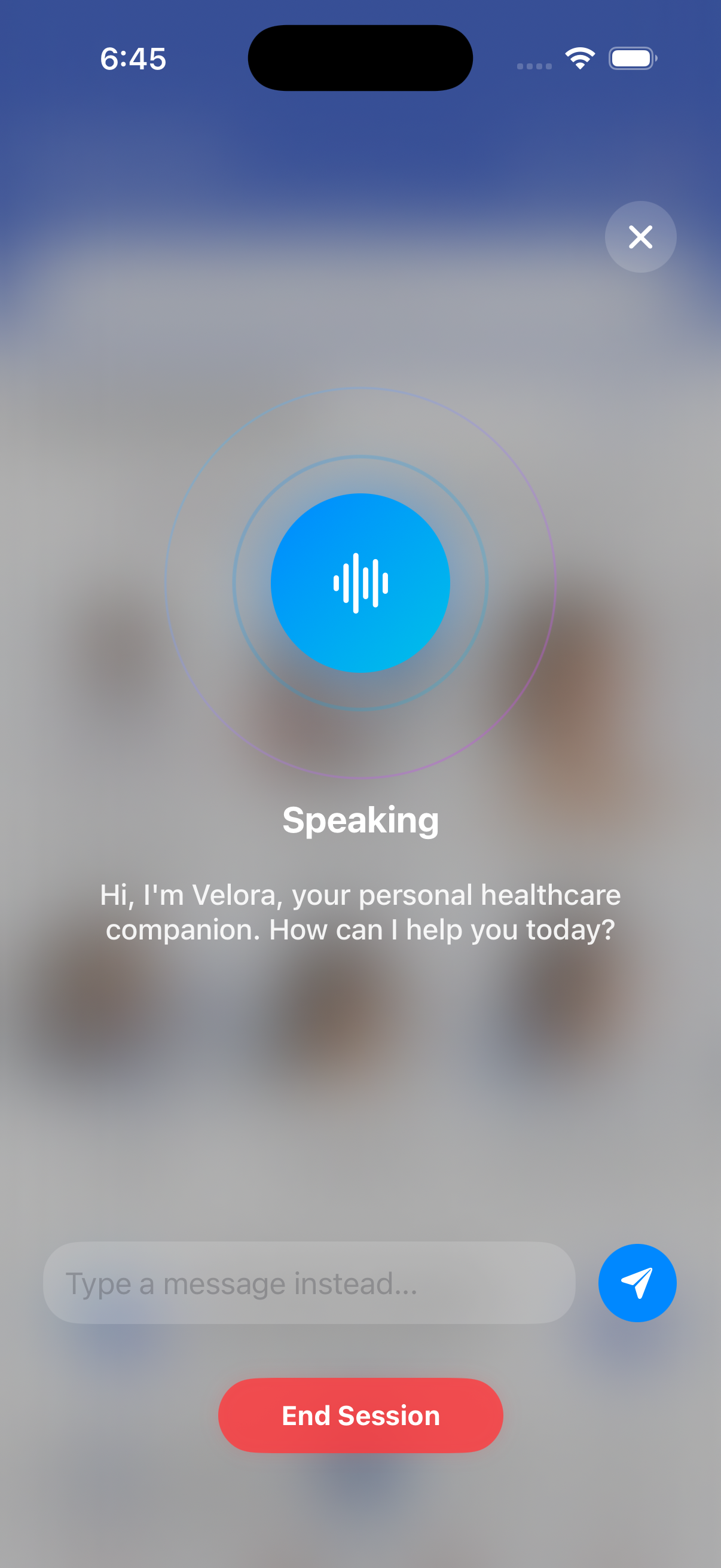
    Use a voice session for a natural conversation or switch to typed messages whenever speaking is not convenient.

  5. 05

    Speak in the language that feels natural

    Velora is designed to communicate by voice or text across the Indian languages supported in Curamigo—including Hindi, Tamil, Telugu, Bengali, Assamese, Maithili and Konkani—so more people can describe concerns in familiar words.

Velora informs; it does not diagnose or prescribe. It is not an emergency service. Urgent concerns should go directly to local emergency services.

Curamigo App showing Velora AI in a voice conversation with an option to type a message instead

04 Your care journey

Choose how to consult. Continue with clarity.

The consultation is the centre of the journey. Context before it and continuity afterwards help make that moment more useful.

  1. Moment 01

    Choose the consultation setting

    Select an in-clinic visit, a home visit or an online video consultation when that mode is available inside the app.

  2. Moment 02

    Bring useful context

    Keep your history, allergies, medication and previous records ready instead of rebuilding the story from memory.

  3. Moment 03

    Consult in the way that fits

    Meet in person at a clinic, receive care at home, or speak face to face online by video.

  4. Moment 04

    Leave with something clear

    Return to prescriptions and shared instructions after the consultation, when questions often begin.

  5. Moment 05

    Follow through at home

    Use medication routines, reminders and vitals tracking to keep the next part of care visible.

05 Privacy & control

Your health story is personal.

Curamigo is designed to keep personal health information organised without treating every person or permission as the same.

  • Personal information stays scoped

    Sensitive records are treated differently from ordinary account and service information.

  • Sharing should have a purpose

    Health information should travel only when it supports your care and only within the access intended for it.

  • Family profiles stay separate

    Looking after someone does not merge their health information into yours.

Designed around the patient

One profile at the centre. Clear boundaries around it.

Records, family care and emergency information remain connected without becoming indistinguishable.

Conceptual illustration of patient-centred access boundaries.

Our point of view

Better care should not ask you to start your story again.

From the Curamigo product principles

06 Questions

What patients often want to know.

Is this a booking website?

No. This website explains Curamigo. Care is arranged within the app experience, not on these pages.

What can Velora AI help with?

Velora can explain health terms, help organise symptom details and consultation questions, and guide patients toward a care category or specialist type to consider. It accepts voice or typed messages, but it does not diagnose, prescribe or replace emergency services.

Can I keep records for my family?

Yes. Family profiles keep each person's records and medication routines separate while allowing care from one account.

What can I keep in my health record?

The patient experience is designed around prescriptions, lab reports, scans, vitals, medication routines and emergency information.

Which languages are supported?

The patient interface is designed for English and a broad range of Indian languages, including Hindi, Tamil, Telugu, Bengali, Assamese, Maithili and Konkani.

Can I explore care by specialist type?

Yes. The Curamigo App groups care into categories such as general physician, women's health, child health, skin and hair, dental, eye, heart, mental wellness and other focused areas. Availability depends on participating providers.

How do I book an appointment?

Booking is completed in the Curamigo App. You choose a specialist category, review the doctor and the consultation fee per visit, then select a date and a morning, afternoon or evening slot in a guided flow. This website does not take bookings.

What consultation modes does Curamigo support?

Curamigo supports in-clinic visits, home visits and online video consultations. The modes available to a patient depend on the care provider and are handled inside the app, not on this informational website.

Where is information for care partners?

Information for doctors, clinics and hospitals is available on the separate Partners page.

07 The Curamigo App

Three ways to consult. One app for what follows.

Use Curamigo for in-clinic, home visit and online video consultation pathways, then return to the prescriptions, records, medication and family information connected to your care.

  • In-clinic, home visit and online video consultation pathways
  • Records, vitals and medication in one place
  • Separate family profiles alongside your own
  • An emergency medical ID designed for clarity
  • An interface in the language you think in
Curamigo app launch screen with a white Curamigo wordmark on royal blue

Download the app now

Download on theApp Store GET IT ONGoogle Play

Coming soon

More of your care, in the same app.

Three additions are planned for Curamigo, so more of the journey around a consultation stays in one place.

  1. 01

    Cashless insurance

    Insurance support with cashless consultations, so eligible care can be settled directly instead of paying up front and claiming later.

  2. 02

    Lab tests

    Book and track lab tests, with reports arriving in the same health record as your consultations.

  3. 03

    Medicine purchasing

    Order prescribed medicine from within the app, connected to the prescription it belongs to.

These features are not available yet. They will appear in the Curamigo App once released.